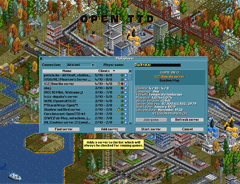
The multiplayer window. From here we can get a list of servers either from the internet or local LAN. These can be sorted to your liking. The green blobs mean you can join the server, passworded servers are shown with a lock. To add your favourite server click ‘Add server’ and fill in the IP.

Recent News

OpenTTD 15.0-RC4

Third, er, Fourth try’s the charm? You found some bugs that needed fixing before the full release of OpenTTD 15. Let’s do one last (we hope) Release Candidate.

We’ve fixed two crashes related to station windows and signs, a hang related to implicit orders, and have stopped cacti from dying off completely with some tree spread settings.

As always, if you spot any more bugs, please report them here.

We’ve heard from many of our translators that they’ve finished their languages. If your language needs updating, it’s the last chance! Check on your language here.

OpenTTD 15.0-RC3

Third try’s the charm? We hope so; here’s our third release candidate for OpenTTD 15.

Most notably, the game no longer forgets your script configuration, and we’ve also fixed some rare crashes. See the changelog for the full list.

As always, if you spot any more bugs, please report them here.

If you’re one of our valued translators, this is the last call for translations for OpenTTD 15! Check on your language here.

OpenTTD 15.0-RC2

Today we release 15.0-RC2, the second release candidate for the upcoming release. You’ve found several issues in the first release candidate, mostly related to the expanded font rendering. In the interest of stability, we’ve backed most of them out again, for a return at a later date when the feature is more stable. As always, see the changelog for the full list.

However, there is a good chance there are still some issues out there that haven’t been found yet. Please help us hunt those down, and if you find one, you can report them here.

Translation updates are coming in every day, and while some languages are complete or are nearing completion, there are also translations with missing or outdated strings. If you are a translator, please see if your language has any missing translations. We greatly appreciate your contribution!

OpenTTD 15.0-RC1

Good things come to those who wait. OpenTTD 15 is starting the final lap with first release candidate!

With a release candidate, the focus shifts from adding new features to finding and fixing bugs to make OpenTTD 15 the best OpenTTD yet. The finding part is where you, the players, come in, too. If there’s anything you notice, head over to our issue tracker and make a report.

If you’ve already played any of the betas and use the OpenGFX baseset, you might have noticed a message about missing sprites. This is due to some of the new features in OpenTTD 15. We recommend switching to the newer (and still updated) OpenGFX2 baseset, which you can easly get via the in-game content downloader.

Some notable changes over the previous beta3 release are:

  • Automatic font loading for characters not part of the normal language files (like e.g. player names or chat messages)
  • Signs, waypoint and station names may be moved
  • Terrain generator can make wetlands for rivers unable to reach the sea
  • Island maps and heightmaps can be surrounded by infinite water instead of black
  • Bridges can now be built over locks and docks, too
  • Various tweaks to interface scaling
  • Improvements and fixes to badge support
  • [NewGRF] Support for trains with multiple rail types
  • A variety of bugfixes

As always, see the changelog for the full list.

OpenTTD 15.0-beta3

Did you have a lazy summer? Over at OpenTTD HQ, we did not!

We’ve continued to make improvements to OpenTTD, both very visible to player and under the hood. It’s time for another beta so you can help us test. Highlights include:

  • Bridges can now be built over stations (NewGRF stations must be updated to support this)
  • [NewGRF] Bridge GRFs can now have pillar information, so that a pillar can be skipped if it obstructs the tile below (rail, road, or station)
  • Ships traveling in opposite directions try not to drive on the same line of tiles
  • Purchase and picker menus can now be filtered using NewGRF Badges
  • Settings and Options menus have been merged
  • Scenario Editor has improvements for placing and expanding towns
    • New buttons to expand town roads and buildings separately
    • “Many random towns” button now prompts for the number of towns
  • Picker window sprite previews can be increased in height, so you can see the entire skyscraper in the house picker (for example)
  • The Infrastructure list window now has a scrollbar
  • A variety of bugfixes

(As always, see the changelog for further details).